IMPORTANT NOTIFICATION

This site is an archive of Simon's first blog.
Current writing and commentary is now published at
simonedwards.com.
Showing posts with label android. Show all posts

Tuesday, 17 November 2020

Windows Security wants your Outlook password (over and over) - SOLVED

Scenario: Outlook on your Windows 10 PC has stopped working. It continually asks for your username and password, but nothing you type will work.

You rarely want to see this, particularly on a busy day

You've tried Googling it. There is lots of advice about resetting Profiles, deleting Credentials from Windows and so on. Much of this is scary and time-consuming. Most of it doesn't work. And you need to get your work done. What should you do?

Tuesday, 12 May 2015

12 computer security tips

The bad guys can try to break in using computers only or they can try to trick you into providing them with access. Or they can use a mixture of tactics. Let's consider two main types of attack:

* Technical – breaking in via computers only
* Human – tricking people into aiding the attack

For the technical attacks you might consider the following, in order of priority/effectiveness:

Monday, 8 December 2014

Pre-infected smartphones

Some Android mobile phones are being sold pre-infected with malware.

According to a blog post by Lookout's Jeremy Linden, "DeathRing is a Chinese Trojan that is pre-installed on a number of smartphones most popular in Asian and African countries."

Some of the most important points from his report include:

  • Detections are moderate in volume.
  • Detections are global.
  • The Trojan pretends to be a ringtone app.
  • The Trojan downloads SMS and WAP content.
  • The downloaded content can be used to trick users.
  • Most of the affected devices are counterfeit or uncommon models (in the West).
  • Anti-malware software cannot remove it.
The main lesson to learn here is to buy non-counterfeit devices from reputable sources. You might also consider installing an anti-malware product to alert you to problems. And watch for unexpected charges on your mobile phone bill.

[Image: Sad Android by Justin Marden]

Tuesday, 16 September 2014

Does your smartphone belong to you?

That expensive smartphone (iPhone, Android, whatever) that you spend your life staring at - is it yours? I mean, really under your control?

Do you have complete mastery over the content that it accesses, the files it downloads and the behaviour that it tracks?

If you buy a digital book will that book always belong to you, or could it disappear one day if the publisher decides to withdraw it?

If you aren't interested in a music band will its latest album appear on your device automatically?

Who has access to information about your personal fitness, such as how long it takes you to complete a run, and how often you exercise?

Apple has, with its iPhone and, to a lesser extent, OS X-based personal computers taken away some of the control that people assume they have over their electronic devices.

Most people don't seem to care, possibly because they don't realise that their £600+ device is actually controlled by Apple rather than them. So when something happens that highlights this fact the result is shock and outrage.

This last week Apple launched a new iPhone and simultaneously made freely available rock band U2's new album Songs of Innocence to 500 million iTunes customers.

This caused many vocal users to express their enormous, four-letter-word-based displeasure via Twitter.

The problem seemed not that Apple was giving away some music but that it was appearing on people's devices without their explicit consent.

That, and the fact many people tie their identities up with music so closely that getting it 'wrong' is more than annoying - it can be insulting.

If Apple had wanted to offer a music album for free it could have sent out vouchers to iTunes users' email accounts or pushed some sort of offer through iTunes itself. Instead it rather arrogantly uploaded the music to people's devices while providing no clear way for them to remove the content.

Days later the company issued a removal tool.

Apple is not the only company to control personal electronics, though. Android devices are ultimately controlled by Google, which is why the company is able to offer remote locking and wiping services, and all your files end up in the cloud unless you are very careful.

Google hasn't (yet) pushed content in the same way as Apple, though, and just two weeks ago it made available a Shaun the Sheep cartoon for free via its Play store. I don't remember a Twitter-storm of angst when that happened, probably because no files were automatically uploaded.

Amazon's Kindle is also controlled remotely and Amazon has, in distinct contrast to Apple's latest stunt, actually removed content from users' devices in the past. In 2009 it deleted copies of 1984 and Animal Farm due to copyright issues. This was an unpopular move because, again, it highlighted the fact that these devices are a means for content consumption and are managed remotely by those who largely sell the content.

We live next to these devices 24/7 and they are so important to us that online surveys abound that ask questions like "Would you rather lose your smartphone or... get a bad haircut/go without sex/something else?" The idea that they are not really ours and under our complete control is more than uncomfortable - it's unbelievable. Which is why so many people get upset when it's pointed out to them in no uncertain terms.

Friday, 20 June 2014

Mobile phone kill switches

Microsoft and Google have just announced so-called kill switches for Windows Phone and Android devices.

Apparently this is a response to a reduction of iPhone thefts reported since Apple introduced Activation Lock into iOS 7.

Kill switches are great in principle but hard to implement properly.

Don't assume that a kill switch will 'brick' a phone.

A kill switch is a way to render a lost or stolen phone useless, but currently they don't really do that. Or not fully, at least.

Users can lock or wipe Android devices remotely using third-party apps and, more recently, the Android Device Manager. Windows Phone users will soon see similar abilities included in the Find My Phone feature.

Wiping resets the device and that effectively means the thief (or whoever finds it) gets to keep a fresh and functional gadget. A locked smartphone can be reset too. The data may be wiped but someone else gets the benefit of your expensive hardware.

It's been possible to lock and wipe mobile devices from the major vendors for a while now. The real news is that these security features will soon be enabled by default.

The official statement from Attorney General Schneiderman includes, right at the end, the following:
"Because kill switches are only available on an opt-in basis, not enough consumers are signing-up. This underscores the urgency... to make kill switches a standard opt-out function on all phones."
So we've had kill switches for a while and now they will be opt-out. So far so good.

The kill switches used or planned by Apple, Google and Microsoft are based on software. As we know, there are ways to resurrect a phone locked down by software.

A more effective option would be to build new phones with hardware kill switches. Imagine a fuse that can be blown remotely. The device would then be properly 'killed' and would require expensive repairs to restore the device.

Hardware kill switches bring their own problems.

  1. How do you test that they work without destroying your new phone?
  2. If you can't test the kill switch, how confident are you that it will work when you need it?
  3. You might 'brick' your lost phone and then find it down the back of the sofa.

If introducing software security features reduces thefts of expensive devices then it's worth doing, but users should be aware of the limitations inherent in this approach.

One final thought: if an unauthorised individual or organisation was to gain access to your account they would be able to kill your phone, tablet or other mobile device. If the kill switch was a software version then you'd experience significant inconvenience. If it was of a hardware type you'd face additional cost.

Wednesday, 11 June 2014

Are Chromebooks insecure travel companions?

Do not connect a Chromebook to a public wireless network if you don't want to risk leaking personal information.

This advice is not some half-baked journalistic opinion but comes direct from the UK government’s National Technical Authority for Information Assurance (CESG).

The CESG advises that even for data with the lowest security classification [PDF], labelled 'OFFICIAL', Chromebooks are unsuitable for a number of reasons, one being that the Virtual Private Network (VPN) included is not up to scratch and there are no viable alternatives.

Yesterday the organisation published its End User Devices Security Guidance: Chrome OS, which states:
"The VPN has not been independently assured to Foundation Grade, and does not currently support some of the mandatory requirements expected from assured VPNs. The VPN can be disabled by the user and some Google traffic is sent prior to the VPN being established resulting in potential for data leakage onto untrusted networks. Without assurance in the VPN there is a risk that data transiting from the device could be compromised"
There is a similar warning in the Android guide that the in-built VPN for Android 4.4 has not been assured, although it does not appear to leak data automatically and there are alternatives available.

If you don't use a VPN when using public WiFi then you are at no greater risk when using a Chromebook than any other device, but if you are security conscious and want to stay safe when moving around at home and abroad it's better to stick with an Android tablet than move over to a Chromebook.

Thursday, 5 June 2014

Three Android Security Essentials

I recommend the following three tools for improving your security when using Android phones.

These will allow you to:

  1. Locate or disable a lost or stolen phone
  2. Prevent surveillance of your WiFi and mobile data use
  3. Further improve the security of your internet accounts
Additionally protection from malware is provided by the second tool but, for Android, I don't believe that such threats are currently significant for users who avoid unofficial application stores.

Two tools are free. I've included one that is not because I believe that the free alternatives are not sufficient.

Google Android Device Manager
Why: Ring, lock or erase your phone remotely
Cost: Free
Where: Already installed or Google Play Store


Install the application if necessary and visit the management console using another computer (phone, tablet or PC), logging in with a Google account that is present on your phone.

If you lose your phone nearby you can locate it using its ringer. If you lose it further afield you can locate it using GPS. If it's really lost or stolen you can wipe it.

More information, including a video on what the wiping process looks like.

F-Secure Freedome
Why: Use public WiFi networks safely
Cost: £20.99/year (or £2.99/month)
Where: Google Play Store


Prevent others from monitoring your internet use, passwords and other sensitive data by clicking the Protection button.

When it says 'On' your connection to the internet is encrypted, even if the websites you use do not use encryption.

Additionally this product claims to protect against web-based threats including harmful applications, websites and sites that track your online activity.

If you are considering a free VPN bear in mind that you don't necessarily know who is running it and what information they are taking from you to fund it.

Google Authenticator
Why: Increased security for your internet accounts
Cost: Free
Where: Google Play Store


Not only available for Android, this security tool makes your internet accounts much harder to crack.

Compatible services include Google Apps and Mail; Dropbox; LastPass; and WordPress. That is just a short list of those using Authenticator.

Thursday, 13 March 2014

How to handle lost Android devices

If your Android device has been lost or stolen, you can reduce your losses.

It's always a shame to lose expensive items but quite possibly you value your data, such as photos and email, more than the box of tricks that lets you access it.

Let's work on the assumption that you have allowed Google to backup your photos and so on, and that your email and other files are also 'in the cloud'.

Imagine, then, that you've lost your phone or tablet. You have a few choices. You can:

1. Do nothing
2. Locate the device
3. Lock the device
4. Wipe the device

Options two, three and four usually involve installing some third-party security software.

Arguably this is one of the best reasons to install an anti-malware product into an Android device because there's little chance of accidentally becoming infected if you stick to the Google Play store. According to mobile security firm Lookout those in the US and Western Europe were very unlikely to encounter malware on their phones and tablets.

That said, last year Google enabled the Android Device Manager (ADM), which is included in recent versions of Android. This does the job nicely without the need for third-party software.

Visit the ADM webpage and log in using one of the accounts associated with one of your devices. You will then see a list of all compatible Android devices that you own.

If you have simply lost your phone then the location feature could help you track it down. You may wish to use the lock feature before you start looking, just to be on the safe side.

Locking the device also allows you to pop up a message for anyone who finds your device, so you could provide details for its return (with or without a reward).

Ultimately, though, if you think the device is gone for good you might as well wipe it. If someone finds it they get a fresh second-hand device but your data, login details for your internet accounts and so on are no longer available.

The video below shows a very quick (around two minutes) summary of what you can expect to see (and what the thief sees) when you first lock the device, providing a message to help them return it.

We'll also pretend that we've given up on the idea of ever seeing our tablet again and wipe it completely.


The tablet above is a Nexus 7 that was encrypted for extra security. None of the above techniques will work if the device is offline, which includes being turned off. That means encrypted devices, once rebooted, cannot be wiped as they will never get to the point of connecting to the internet - unless the thief knows and uses your encryption password.

The upshot of this is, if you encrypt your devices and then lose them you should issue the wipe command as soon as possible. If not, when they inevitably run out of power, you'll have no way to contact them. Of course, with encryption in place you may not care.

Friday, 14 February 2014

QR code drive-by one step closer?

A vulnerability in the majority of Android devices allows an attacker to take remote control of a victim's phone or tablet.

According to a blog post by Rapid7's Tod Beardsley, researchers have demonstrated a combination of a QR code and malicious Javascript that can provide an attacker with a remote shell to the target.

Just to get some facts clear, the attack is not QR code-based. We're not talking about exploiting a QR code scanner to launch an attack. The user still has to choose a browser and proceed to a website that contains the malicious Javascript.

However, it makes sense to initiate the attack with a QR code because that's one way mobile device users visit websites. QR codes are also very visual and so help make demonstration videos more dramatic.

The really important point to take away from this attack is that users do not have to allow any new (malicious) application to run. This is not a social engineering attack in which the user is tricked into installing a malicious application.

They simply need to visit a website (QR code-initiated or not) and the attacker is able to run commands on their device.

It is possible that there are earlier demonstrations of Android-based automatic (aka 'drive-by') attacks, but I've not seen any until now.

Tuesday, 17 September 2013

USB condom pumped up in press

Some IT news websites have posted excited articles about a new 'USB condom' that protects devices from hostile charging stations.

Unless I'm missing something, I think this excitement is a little unwarranted.

The threat

You plug your phone into an untrusted USB charger. This is secretly connected to a computer that mounts the phone's storage and accesses its data. This is known as 'juice-jacking'.

The solution

If you must charge your devices using an untrusted charging station you may improve your security by turning them off completely. You should receive a faster charge that way, too.

Alternatively use a USB charging cable, which is like a regular cable but the data pins are not connected. You can make one of these yourself very cheaply. It's not hard but, if you don't want to DIY, ready-made options are inexpensive - frequently less than £5.

The USB condom

The USB condom works by "cutting off the data pins in the USB cable and allowing only the power pins to connect through." So, very much the same as a USB charging cable then.

Pricing for this connector is not yet available* but, if it is very much lower than £5, it'll be a worthy addition to any security-conscious traveller's cable bag.

* UPDATE (18/09/2013): Pricing for these devices is now available. The USB Micro-B and USB Type A models are $9.99 each. In my opinion that is poor value for money.

Monday, 5 August 2013

The mystery of Google's app for wiping and locating phones

Late last week the media predicted the imminent launch of a new Google application for Android phones that would allow users to locate or wipe their devices.

The Register wrote, "Google has announced that it will begin offering a free device location and security service for Android phones and tablets for the first time later this month, addressing a longstanding (sic) omission in Mountain View's mobile OS."

Such security features are often included with anti-malware applications, while there are also dedicated apps that provide only the location and memory-wiping abilities.

The news that Google was going to launch its new Android Device Manager security service and application made me a little confused. I thought it already had put out something similar ages ago. In fact I remember seeing an app called Google Apps Device Policy on pretty much every device that I've used.


Here is Google's description of Google Apps Device Policy:
***THIS APP IS FOR GOOGLE APPS FOR BUSINESS, EDUCATION, AND GOVERNMENT USERS ONLY***
Google Apps Device Policy makes your Android device more secure
* Ring or locate a lost device via My Devices (https://www.google.com/apps/mydevices)
* Remotely lock device or change pin
* Administrators can enforce security policies and remotely wipe devices


The app is clearly only available to use for those who pay for Google Apps. Indeed, if you visit the URL above you'll see a message verifying that fact.


My confusion was compounded, however, when I came to verify the name of the app before writing this article. My current phone and tablet, a Nexus 4 and Nexus 7, are running the latest version of Android (4.3) and now no longer show Google Apps Device Policy as being available.

As the first screenshots above show, though, the program was certainly installed at some point. In fact it has been installed not only on the devices I use day to day but also on the first Android phone I ever bought and all devices bought since.

It's great news that ordinary users will have access to these features. It's just a little surprising that a similar, installed product seems to have become invisible or been removed.

Tuesday, 23 July 2013

Smartphone security

In 1999 a PC this powerful
would cost twice as much and
be 100 times bigger
At the moment we are, in terms of mobile malware development, in 1998.

Remember when we all used Windows 95 and connected with modems? The threats of the day were Trojans that would dial premium numbers to generate/steal money from victims.

As far as I can tell, that’s where we are today with smartphones.

Modern, powerful mobile handsets are essentially PCs with a modem, run by users who access banks and other financially-connected sites. I've yet to see any evidence of iOS or Android-compatible drive-by attacks so right now social engineering seems to be the most significant threat.

As such, a slight variation on the advice we used to give in the late 1990s is probably suitable:

  1. Keep your phone’s firmware up to date (updates from vendor, via Android Settings).
  2. Keep your software up to date (via Google Play updates). These updates can be set to run automatically.
  3. Only install from official stores such as Google Play. Don’t side-load (i.e. install from removable media).
  4. Ensure the software comes from the original developer. Google Play lists the developer and highlights very popular ones with the ‘Top Developer’ label.
  5. Check the reviews of each application you want.
  6. Check the permissions that each application requires and reject it if it wants too much (in your opinion).
  7. When updating manually, review any new permissions the updated application requires.
  8. Avoid pirated/cracked software, whatever the source.
  9. Install an anti-malware product. After all, even the official stores have been found to host malicious files.

While all this will help, I doubt that normal people will neither bother nor be able to fully understand or remember the details. That's not their fault, though. It's the fault of the mobile industry. It should be easier to be more secure.

This article updates last year's notes on Android security tips.

Monday, 21 January 2013

Howto: Bullet-proof your email account

Usernames and passwords can be guessed or stolen. You can add additional layers of security that significantly reduce the chances of an attacker accessing your account.

First of all, always use encrypted connections when using your email service. If you don't know about HTTPS/SSL, please read Howto: Handle a hacked email account first.

Popular web-based email services, such as Gmail and Yahoo! Mail, secure accounts using a username and password. Some, including both Gmail and Yahoo! Mail, allow you to use an additional security measure called two-factor authentication (aka two-step verification).

Two-factor authentication

Using two-factor authentication is easier than the system's name suggests.

You may already have used two-factor authentication if you bank online with certain banks. Essentially you log in with your username and password, but must then type in a code that changes on a regular basis.

Every time you or someone else tries to access your account from a new system (PC, Mac, phone, tablet etc.), a code is required. You may also have to re-enter a code after a period of time.

A bank may require a code every time you log in. Google Mail will ask you once every 30 days.

The code may be generated by a small handheld device; by software installed on a smartphone; or it may even be sent by text (SMS) message to your phone.

Google provides a free Android app called Google Authenticator, which generates the code. Alternatively you can use one of the other options provided by Google, such as text messaging or even a voice call.

Other services

Some other web services allow users to add this optional secondary level of security. Following an embarrassing compromise, which potentially exposed users' files, Dropbox offered a two-step verification option to users.

Dealing with an extra log-in step once every few weeks is only slightly inconvenient and the level of additional security makes it well worthwhile.

Delhi scammers bypass two-factor authentication

Although using two-factor authentication is much more secure than relying only on passwords, it is possible for sneaky people to trick their way into obtaining the code.

A pair of Indian criminals were caught recently, having conned a mobile phone company into sending them 'replacement' SIM cards belonging to customers.

They were then able to log into victims' bank accounts, using the SIMs to receive security codes sent by SMS.

Friday, 22 June 2012

Android apps security tips

Do most users care
about app permissions?
How can you be sure that the apps (programs) that you install on your Android phone are safe?

I'm asked this question quite frequently by my less technically-interested friends, so here are a few tips that cover the basics.

I'll just note that there are lots of additional ways in which you can improve the security of your Android phone, but I don't think it's realistic to expect normal people, who lack an interest in security, to implement any special measures.

The tips

1. Only download applications from established sources, such as Google Play or Samsung Apps.

2. Use the store app on your phone to download the programs. Don't sideload.

3. Before downloading, check that the publisher of the app is one that you trust.

4. Before downloading, check the reviews of that app on the store. Read users' comments, too.

5. Before downloading, check the permissions that the app requires. Don't install an app if you are suspicious about the extent of permissions that it requires...


6. ... and when updating an app, check that it is not requesting any further permissions


The bad news


Even these six basic tips expect too much of an average user.


In real life, who restricts themselves to trusted publishers? How can you even tell who publishes an app? The publisher's name, as published on an app store, could be false. Additionally, review scores and comments can be faked.


The real problem, though, is that users are expected to read and understand the list of permissions that each app requires. Truly understanding this list, and comprehending the significance of whether or not an app needs to have access to the contacts database or the ability to send text messages, seems way beyond the abilities and (most crucially) interests of any normal user.

In my opinion, most people just want to use their phones. This means, among other things, downloading software that improves their experience. They don't want to think about weird little technical details, such as whether or not it's important that application X requires permissions A, B and C.

They don't want to know how it works, just so long as it does.

If I'm right then the majority won't even see the tips above, let along follow them. It would be far more helpful if Android itself provided some sort of warning, rather than just listing a load of technical data.

For those who do care, they still face one problem when deciding whether to install or not. There is no way (currently) to deny some permissions and allow others. It's an all or nothing decision - like it or lump it.

It would be far better to be able to install an application but deny some of the more intrusive permissions. If that causes the app to fail, so be it. The user then has a choice of allowing it the permissions it wants, or uninstalling it.

Thursday, 29 March 2012

How the police crack smart phones

It is easy for law enforcement and security services to pull data from a PC, unless the owner has taken some fairly advanced privacy measures. The same is not the case for smart phones.

Smart phones, such as Android handsets and Apple's iPhone, run operating systems that work in a fairly secure way. The user is unable to gain low-level access to the system, which also makes it hard for hackers and malware to gain a foothold.

This in-built security poses a significant challenge to the police, who have legitimate reasons for cracking open phones belonging to criminals. So how do the instruments of law gain access to phones? By hacking them, of course.

Hacking a phone, by which I mean using one or more tools to exploit a security hole (vulnerability) in the operating system or other low-level software, can be tricky. To make life easier some businesses have made automatic tools available.

Both Micro Systemation and Elcomsoft offer tools to law enforcement that achieve the same goal. They work in essentially the same way, which is to exploit a security hole in order to gain full access to the system. They then dump information down to a computer for analysis.

Micro Systemation published a very clear video that demonstrated its slick system but today (29/03/2012) the video was no longer available. You could try the original link to see if it has been put up again.

Elcomsoft has published a video demonstration that shows its system to be more command-line based. This video is also available below.


[This week there were reports in the mainstream media that new rules proposed by the EU would outlaw hacking tools. Cue security experts complaining that this will prevent legitimate security work.

This argument emerges every time the law changes to catch up with modern crime and terror techniques. I remember unsuccessful predictions being made in 2006 when the Computer Misuse Act was revamped.

My prediction is that penetration testing will not be outlawed, security research will continue unabated and companies like Micro Systemation and Elcomsoft will continue to sell their services to the police.

And the criminals will also continue with their activities too.]

Wednesday, 21 March 2012

Targeted adverts strip your privacy

Targeted advertising walks a fine line between being useful and being creepy. As I wrote a while back, one close experience of targeted advertising raised my hackles and I imagine the same goes for others too.

Now it seems that adverts served from Android apps could be even more intrusive than those found on some websites.

Bit9 has written an article about how this can compromise both your privacy and even your device. Summarising a paper by Xuxian Jiang, the piece notes that adverts sometimes track users' GPS coordinates, while one particularly insidious example could be controlled remotely.
"The most concerning factor was the unsafe fetching and loading of dynamic code without user permission or control. Out of these ad libraries, 48,319 tracked GPS location; 18,575 tracked the identity of the phone; and 4,190 let advertisers track users via GPS. Not only were these apps pulling information like GPS/location data, but they were also attributed with aggregating personal information, call logs, account information, and phone numbers. One actually downloaded suspicious payloads, which allowed the host app to be remotely controlled by the ad in question."
The paper itself summarises the functions available in a number of ad libraries, which app developers can embed into their programs. Some are able to initiate phone calls, send text messages and even load classes. The vast majority were capable of reading the device's location data (i.e. GPS coordinates).

I am sure that some companies will be able to work out how to provide a useful targeted advertising service. I'm just yet to see one.

Android "most attacked" mobile operating system

Tom's Guide reports that the Android operating system is now under heavy attack in comparison to other mobile platforms.

When the article mentions 'threats' it means individual Trojans in almost all cases. Viruses and worms don't really feature at all in recent years.
"The number of threats directed at Android in 2011 was a sharp increase from only 9 threats in 2010 -- only trumped by the number of threats for Symbian in 2006 (188) and 2005 (125). Since 2004, F-Secure listed a total of 710 security threats for mobile device. 525 of those affect Symbian, 125 Android, 40 PocketPC, 18 J2ME and 2 iOS. The vast majority of all mobile threats were trojans (519 overall, 136 in 2011). Viruses (56 total) have not been seen since 2007 and worms (38 total) appear to have been abandoned as well."
It will be interesting to see if/when the latest Windows mobile operating system appears on the chart.

Wednesday, 30 November 2011

Mobile rootkit update: video

One week ago Trevor Eckhart reported that HTC phones were loaded with secret software designed to monitor pretty much anything on a smartphone. The story of potential wholesale monitoring was disturbing and was made more so by the legal threats made against him at the time for disclosing the issue.

Eckhart has now released video footage showing how the software is hidden and, most interestingly, the level of logging that it provides. Essentially he monitors the monitor and discloses the information that it collects.

This information includes details (including the text of) SMS messages, the handset's location and even records of the specific handsets buttons that are pressed by the user - in real-time. 


Monday, 7 November 2011

Malicious Android app stores

Rogue Android App stores are making Trojan applications available on purpose.

Researchers have known for some time that malicious Android applications are often distributed via online stores other than Google's official Android Market service.

This development is an interesting twist in which the entire alternative store is a scam.

Any benefit of the doubt as to the stores' motives disappears when you realise that the sites are effectively charging money for free applications. The high possibility that these applications are Trojans themselves increases the threat.

The same programs are likely to be both free of Trojans and free of charge when obtained via the safer Android Market.

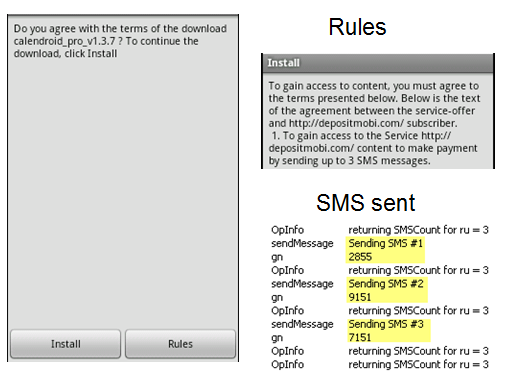
The malicious stores charge unwitting users/victims by requiring them to send text messages to premium rate numbers. When they have increased their balance to a certain amount they can download their chosen apps. These in turn may well send unauthorised text messages to premium rate numbers.

Webroot's researchers expose the SMS scam

Thursday, 27 October 2011

Anti-virus myths busted

Last week I gave the début presentation of my anti-virus myths talk at the London International Technology Show.

A few people have asked for access to the basic information that I used, so here it is. The talk lasted for around 40 minutes so this really is a bare-bones summary.

Myth #1: Anti-virus protects 100%
Real-world protection tests by Dennis Technology Labs (DTL) and other testers show that even well-known brands of security software can be compromised by malware.

Myth #2: Anti-virus slows PCs
In performance tests conducted by DTL, most popular anti-virus software makes virtually no impact on general system performance.
However, system startup (boot) times can be affected, as can shutdown times. These are important because they are very noticeable by users.
Myth #3: I don’t need it (I’ve never been infected)
Current threats tend not to make themselves known to the casual observer. Rootkits make it hard, even for experts. 
Myth #4: Viruses stay in the bad bits of the internet
While some areas of the internet are riskier than others, legitimate sites can be infected. We demonstrated a real, legitimate site infecting our test PC.
Myth #5: Protection costs a lot
Free products are OK, while commercial products often come with multiple licenses.
Myth #6: Avoid Internet Explorer
All popular browsers have security holes. Internet Explorer has fewer known issues than Opera and Firefox. Chrome and Safari are not immune*.
Myth #7: My ISP will save me
There is no business reason why it would, without raising subscription costs. We covered various options to reduce exposure to threats, including ISP-like techniques such as using special DNS services.
Myth #8: Salvation is a Mac, Linux or Android
Attackers go for popular systems. As Mac and Android users become more prevalent so will the threats to those systems. There are more known sets of vulnerabilities for OS X and Linux than there are for Windows*.

The following video clip was taken by one of the audience. Special thanks to PDTalkinTech for providing the photos and this video footage from part of the presentation:


* Data on software vulnerabilities was provided by Secunia.